
Join 100,000+ business leaders
Subscribe to get our most-popular proposal eBook and more top revenue content to help you send docs faster.


Modern organizations move fast. Decisions happen in days, sometimes hours. Payments clear quickly. Deals close faster than ever.
Documents, however, often remain a bottleneck.
For many teams, “going digital” still means scanning paper into PDFs. Filing cabinets are replaced with folders, but the underlying problem stays the same: data remains locked inside documents. Creating, reviewing, and processing files continues to require too much manual effort.
DocStudio supports over 5,300 organizations and has processed more than 800 million documents. Companies such as Nestlé, PepsiCo, and Samsung rely on DocStudio for secure and compliant document workflows. With built-in AI capabilities, DocStudio moves beyond document storage and helps organizations understand, create, and process documents instantly.
Three AI features power this approach: AI Assistant, Help Me Write, and AI Document Recognition.
The challenge
Teams spend significant time reviewing contracts, proposals, and reports just to find key clauses or critical details.
The solution
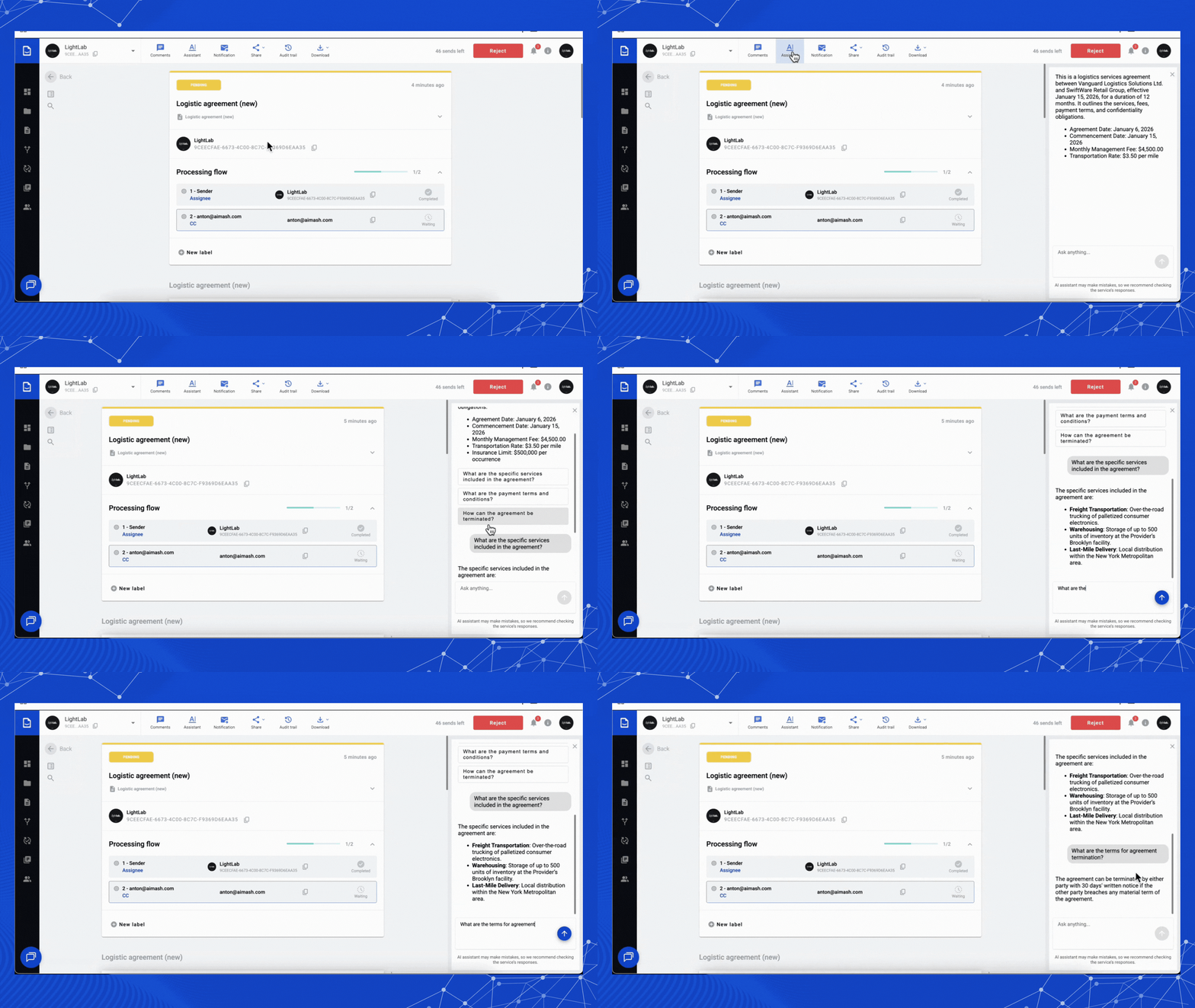
DocStudio’s AI Assistant works directly within documents, providing immediate clarity.
How it works
Instant summaries
When a document is opened, the AI generates a concise overview, explaining what the document is, who it involves, and what it covers - without requiring a full read.
Automatic key data extraction
The AI identifies and highlights important elements such as:
Critical clauses are surfaced automatically, reducing the risk of oversight.
Context-aware questions and answers
The AI suggests relevant questions based on the document type and content. Users can also ask direct questions, such as:
Answers reference the exact clauses in the document.
Why this matters
AI-assisted review reduces manual effort and minimizes risk. Unlike manual reviews, which can be inconsistent, AI applies the same level of attention to every document.
Documents become accessible across teams, not limited to specialists.
.gif)
The challenge
Creating new documents often involves locating old templates, copying files, and manually correcting formatting and placeholders.
The solution
Help Me Write enables document creation using natural language.
Natural language input
A simple prompt such as:
“Create an invoice for marketing services in the United States”
is enough for the AI to understand context, structure, and terminology.
Structured document output
The AI produces a complete, editable document that includes:
The result is a professional document ready for use.
Why this matters
Help Me Write improves consistency across teams and reduces time spent on formatting and structure.
Teams focus on content and approvals rather than document layout.
The challenge
Many critical documents still arrive as scanned images or static PDFs. The information exists but cannot be easily searched, validated, or integrated into systems.
The solution
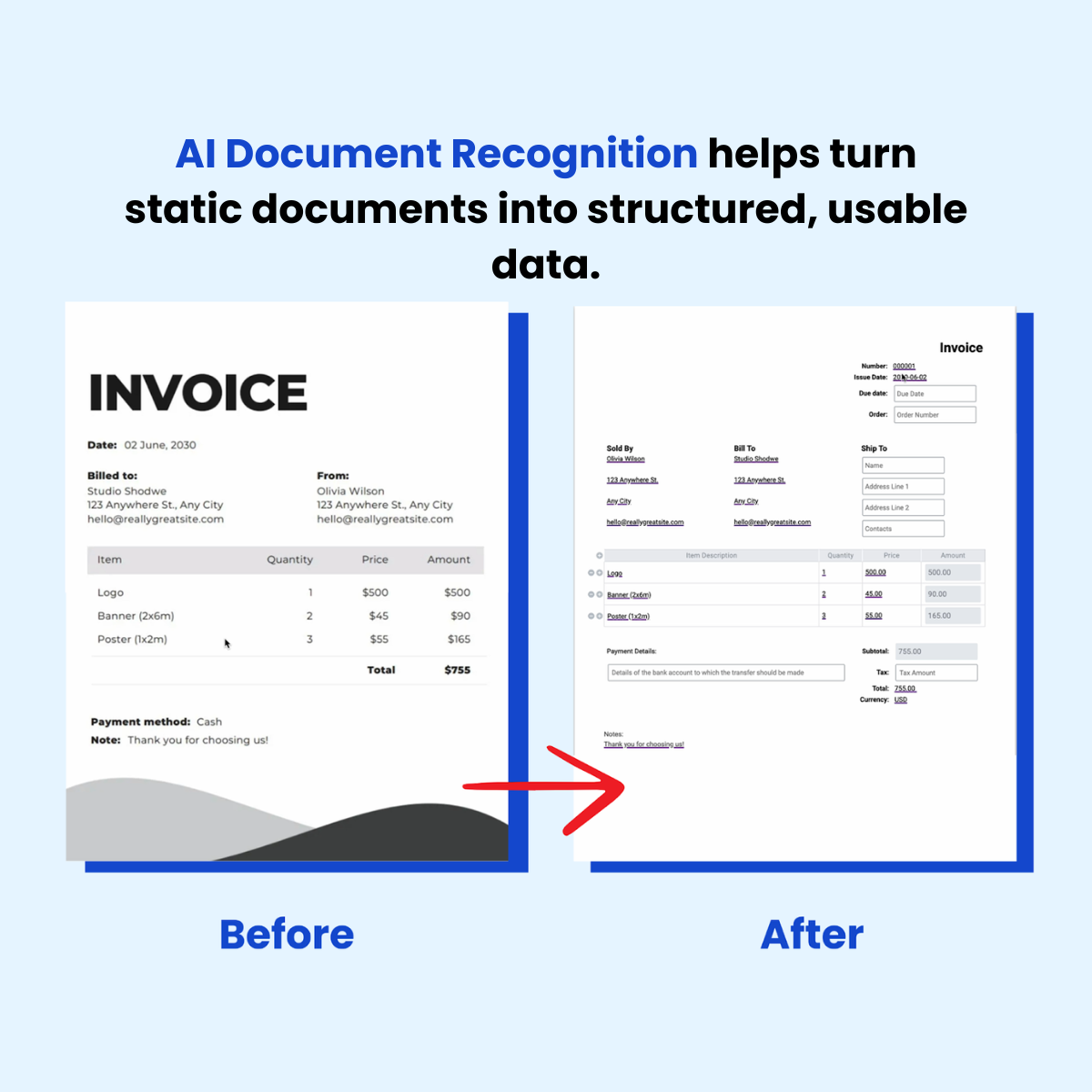
DocStuido AI Document Recognition converts unstructured files into structured, usable data.
Visual Analysis and OCR
Upload a static file (image or PDF). The AI performs Optical Character Recognition combined with semantic understanding. It doesn't just see letters - it recognizes fields. Looking at a messy scanned invoice, it identifies "Total: $500" as a financial value and "Invoice #12345" as a unique identifier.
Template Conversion
Static files become editable DocStudio templates. A flattened PDF becomes a live form. If a vendor sends a quote with a typo, you don't need to request a new version- you convert, edit (with an audit trail), and process it.
Structured Data Extraction
The AI extracts data into machine-readable formats: XML, JSON, or CSV. That PDF invoice from an email gets uploaded to DocStudio, recognized, and pushed via API directly into QuickBooks, SAP, Salesforce, etc.
Built-In Verification
AI accuracy typically runs 95-98%, so DocStudio includes human oversight. You see the "AI Processed" tag and review extracted data. The system highlights low-confidence fields - like handwritten notes on delivery receipts - asking you to verify. You get AI speed with human certainty.
For logistics companies processing thousands of Bills of Lading weekly, or retailers managing invoices from hundreds of suppliers, this is an ROI engine.
Cost Reduction: Manual data entry is expensive and slow. AI Recognition reduces processing costs up to 90%.
Error Elimination: Humans transpose numbers. AI doesn't. Automating long alphanumeric strings (container numbers, SKU codes) drops error rates dramatically.
Faster Cash Flow: In supply chains, payment triggers when Purchase Orders match Invoices and Delivery Notes. Digitize and match these documents instantly upon receipt to speed up your cash conversion cycle.
Each feature delivers value individually. But their real power comes from working together within DocStudio.
Common workflow:
A logistics manager receives a scanned dispute claim from a partner.
This is the future DocStudio is building—a cohesive ecosystem where documents aren't dead weight, but fluid data streams that move at the speed of thought.
Organizations aren't asking "How do we store documents?" anymore. They're asking "What can our documents do for us?"
With DocStudio's AI suite, the answer is: almost anything.
Ready to streamline your document management? Start with a free demo and get your first month free.
About DocStudio
DocStudio is a document automation platform that supports creation, management, electronic signature, and exchange of documents in a single secure environment. Trusted by over 5,300 organizations and used to process more than 800 million documents worldwide. ISO/IEC 27001 certified and compliant with HIPAA and GDPR.

.png)
.png)